
What Is WCAG? A Complete Guide to Web Accessibility Guidelines
The internet has become an essential part of everyday life. People use websites and digital services to shop, communicate, access healthcare, apply for jobs, manage finances, and interact with businesses.
But not everyone experiences the web in the same way.
People with visual, hearing, mobility, cognitive, or other disabilities may face barriers when websites are not designed with accessibility in mind. This is where WCAG — Web Content Accessibility Guidelines — comes in.
WCAG provides a globally recognized framework for making websites and digital content more accessible to people with disabilities.
In this guide, we'll explain what WCAG is, why it matters, the different WCAG conformance levels, the four core accessibility principles, and how businesses can start improving their websites.
What Is WCAG?
WCAG stands for Web Content Accessibility Guidelines.
It is a set of recommendations developed by the World Wide Web Consortium (W3C) through its Web Accessibility Initiative (WAI). WCAG provides technical guidance for making websites, applications, documents, and other digital content more accessible.
WCAG is designed around the idea that digital content should be accessible to as many people as possible, including people who use assistive technologies such as screen readers, screen magnifiers, keyboard navigation, voice control, and other accessibility tools.
WCAG is not a programming language or a piece of software. It is a set of accessibility guidelines that developers, designers, content creators, organizations, and accessibility professionals can use to evaluate and improve digital experiences.
Why Is WCAG Important?
Website accessibility is important for several reasons.
1. It creates a better experience for everyone
Accessibility improvements often make websites easier to use for all visitors.
For example:
- Clear navigation helps users find information faster.
- Captions help people understand videos in noisy environments.
- Good color contrast improves readability.
- Descriptive links make navigation easier.
- Proper form labels make forms easier to complete.
Accessibility is therefore not only about supporting people with disabilities. It is about creating a better digital experience for everyone.
2. It helps reduce accessibility barriers
A poorly designed website can prevent people with disabilities from completing basic tasks.
For example, a person using a screen reader may be unable to understand an image if it does not have appropriate alternative text. A keyboard-only user may be unable to complete a form if interactive elements cannot be accessed using the keyboard.
Following WCAG helps organizations identify and address these barriers.
3. It supports accessibility compliance efforts
Depending on the organization, industry, location, and applicable regulations, accessibility requirements may be legally relevant.
In the United States, for example, organizations may encounter accessibility requirements or legal claims related to laws such as the Americans with Disabilities Act (ADA) and Section 508.
WCAG itself is a technical standard rather than a law. However, WCAG criteria are frequently used as a technical reference when evaluating digital accessibility.
Organizations should therefore consider both their applicable legal requirements and the appropriate accessibility standards for their digital products.
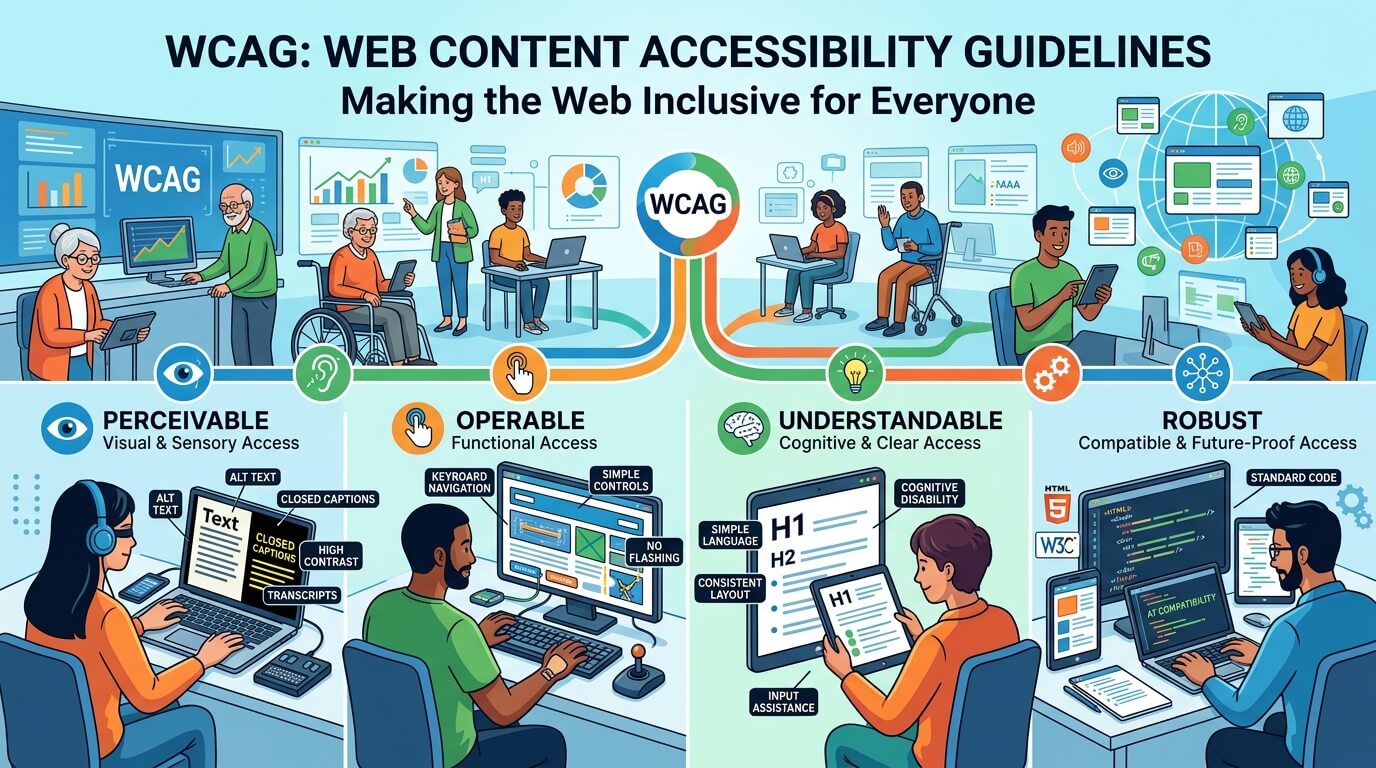
The Four Principles of WCAG
WCAG is organized around four fundamental principles.
These principles are commonly summarized using the acronym POUR:
P — Perceivable
O — Operable
U — Understandable
R — Robust
For a website to be accessible, its content and functionality should satisfy these four principles.
1. Perceivable
Information and user-interface components must be presented in ways users can perceive.
People interact with digital content differently. Some users may not be able to see visual content, while others may have difficulty hearing audio.
Examples of accessibility considerations include:
Alternative text
Images should have appropriate alternative text when the information conveyed by the image is meaningful.
For example, instead of simply using:
image123.jpg
a meaningful description could communicate the purpose or information represented by the image.
Captions
Videos containing spoken dialogue or important audio information should provide appropriate captions.
Color and contrast
Text and important visual information should have sufficient contrast against the background.
Information should also not be communicated through color alone.
For example, instead of saying:
Red means an error and green means successful.
a form should also provide another indicator, such as text or an appropriate programmatic status.
2. Operable
Users must be able to operate the website's interface and navigation.
Not everyone uses a mouse.
Some users navigate websites using:
- Keyboard
- Screen reader
- Voice control
- Switch devices
- Other assistive technologies
Keyboard accessibility
Interactive functionality should generally be accessible using the keyboard.
Users should be able to navigate through important controls such as:
- Links
- Buttons
- Forms
- Menus
- Dialogs
- Interactive components
A website should not require a mouse for essential functionality.
Navigation
Users should be able to understand where they are on a website and move between pages or sections efficiently.
Clear headings, navigation structures, page titles, and landmarks can make a significant difference.
3. Understandable
Information and the operation of the user interface should be understandable.
A website can technically be accessible but still be difficult to understand.
Accessibility considerations include:
Clear instructions
Forms and interactive features should provide clear instructions where necessary.
Consistent navigation
Navigation should behave consistently across pages.
Helpful error messages
When users make a mistake while completing a form, the website should clearly explain what went wrong and, where possible, how to fix it.
For example:
Please enter a valid email address.
is more useful than:
Error 104.
Clear error identification helps users understand and correct problems.
4. Robust
Content should be compatible with current and future user agents, including assistive technologies.
This means websites should use appropriate semantic HTML and follow established accessibility practices so that assistive technologies can correctly interpret the content.
For example, properly implemented headings, buttons, form labels, links, and other interface components help assistive technologies understand the structure and functionality of a page.
A website may look perfect visually while still providing an incomplete experience to someone using a screen reader.
WCAG Conformance Levels
WCAG provides three levels of conformance:
Level A
Level A represents the minimum level of accessibility requirements.
Failure to meet Level A criteria can create significant barriers for users with disabilities.
Level AA
Level AA addresses a broader range of accessibility requirements and is commonly used as a practical target for organizations seeking a strong level of accessibility.
Many accessibility programs and compliance efforts reference WCAG 2.1 or WCAG 2.2 Level AA, depending on their requirements and applicable standards.
Level AAA
Level AAA represents the highest level of WCAG conformance.
It includes more advanced accessibility requirements. However, WCAG does not generally recommend requiring Level AAA conformance for entire websites because it may not be possible to satisfy all Level AAA criteria for every type of content.
For many organizations, WCAG Level AA is an important accessibility target.
WCAG 2.1 vs. WCAG 2.2
WCAG has evolved over time.
WCAG 2.0 was published in 2008.
WCAG 2.1 was released in 2018 and introduced additional success criteria, including requirements addressing mobile accessibility and people with cognitive and learning disabilities.
WCAG 2.2 was published in 2023 and introduced additional success criteria while maintaining backward compatibility with WCAG 2.1.
Organizations should determine which version and conformance level is appropriate based on their legal, contractual, regulatory, and business requirements.
Common Website Accessibility Problems
Some accessibility problems appear frequently during website evaluations.
Examples include:
- Missing or inappropriate alternative text
- Insufficient color contrast
- Missing form labels
- Keyboard navigation problems
- Missing visible focus indicators
- Incorrect heading structure
- Inaccessible menus and dialogs
- Poor link descriptions
- Missing captions or transcripts
- Inaccessible PDF or downloadable documents
- Incorrect ARIA implementation
- Forms that do not provide accessible error messages
- Content that cannot be properly interpreted by screen readers
These issues can affect users' ability to navigate, understand, and interact with a website.
How Can You Test WCAG Compliance?
WCAG testing should ideally combine automated testing and manual evaluation.
Automated accessibility testing
Automated tools can scan websites and identify many common accessibility issues.
They can help detect problems involving areas such as:
- Missing alternative text
- Color contrast
- Form labels
- Page structure
- ARIA attributes
- Links and buttons
Automated testing is useful, but it cannot identify every accessibility problem.
Manual accessibility testing
Manual testing is important because some accessibility issues require human judgment.
Testing may include:
- Keyboard-only navigation
- Screen reader testing
- Focus order testing
- Form interaction
- Navigation testing
- Content readability
- Interactive component testing
- Mobile accessibility testing
The strongest accessibility programs combine automated scans with manual and assistive-technology testing.
Accessibility Widgets: Are They Enough?
Accessibility widgets can provide useful features that allow visitors to adjust certain aspects of a website experience.
Depending on the solution, features may include:
- Text size adjustments
- Contrast adjustments
- Color modifications
- Spacing controls
- Reading assistance
- Screen-reader-related features
- Navigation assistance
However, an accessibility widget should not be treated as a complete replacement for proper website accessibility.
A website can still contain underlying code, structure, content, keyboard, form, or compatibility problems even when an accessibility widget is installed.
For a more comprehensive accessibility strategy, organizations should combine accessibility tools with website auditing, remediation, monitoring, and ongoing testing.
Why Accessibility Should Be an Ongoing Process
Accessibility is not something that should be checked only once.
Websites continuously change.
Developers add new features. Marketing teams publish new content. Designers update pages. New forms and integrations are introduced.
Any of these changes can introduce new accessibility issues.
For this reason, organizations should consider accessibility as an ongoing process:
Audit → Remediate → Test → Monitor → Improve
Regular accessibility monitoring can help organizations identify new issues before they become larger problems.
How WebMax Can Help
At WebMax, we help organizations improve their digital accessibility through a combination of technology, testing, and professional services.
Our accessibility solutions can support organizations with:
- Website accessibility audits
- Accessibility monitoring
- Accessibility remediation
- Accessibility widgets
- WCAG evaluations
- VPAT support
- Accessibility consulting
A comprehensive approach can help organizations better understand their current accessibility position, identify areas for improvement, and establish an ongoing accessibility program.
Final Thoughts
WCAG provides an important framework for creating more accessible websites and digital experiences.
However, accessibility is more than checking boxes on a compliance list. It is about making sure people with different abilities can perceive, navigate, understand, and interact with digital content.
Whether you are launching a new website or improving an existing one, starting with a WCAG-focused accessibility evaluation can help you identify barriers and prioritize improvements.
Accessibility is not a one-time project. It is an ongoing commitment to creating a more inclusive digital experience.
Ready to evaluate your website?
Let WebMax help you understand where your website stands and identify opportunities to improve accessibility.
Visit WebMax at www.webmax.co to learn more about our accessibility audit, monitoring, remediation, and accessibility solutions.